Címke: Microsoft Copilot

  • Grafana K6 készítés Copilot-tal

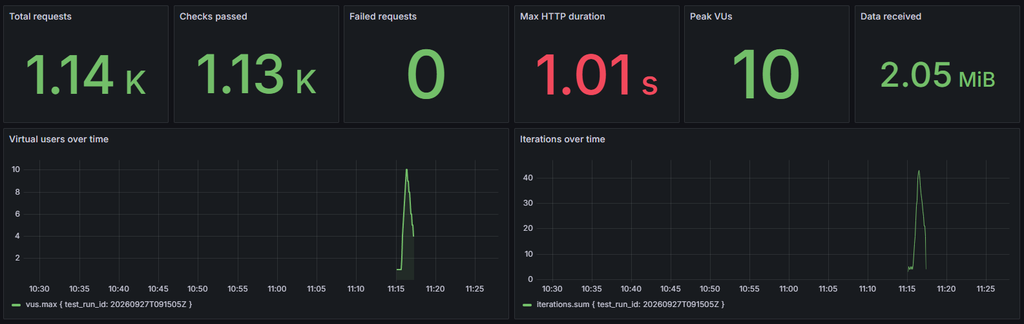
    Mi is történt? Ismét a semmiből kezdtem, megkértem a Copilot-ot, hogy csináljon egy project-et. El is készült, futott, de a riportolásával nem voltam elégedett. Megkérdeztem, hogy mit ajánl rá, ő elsőre a Grafana felhős szolgáltatását ajánlotta, de mivel lokálból akartam megoldani, így kiegyeztünk a Grafana lokális verziójával. Telepített Grafanát, Dockert, InfluxDB-t. Még a Grafana dashboard-ot is vele csináltattam meg. Még koránt sincs kész, de majd megfelelő Token birtoklásával orvosolni fogom.

    Teszt kód:

    import http from 'k6/http';
    import { check, sleep } from 'k6';
    
    export const options = {
      stages: [
        { duration: '40s', target: 2 },
        { duration: '35s', target: 10 },
        { duration: '60s', target: 3 },
      ],
      thresholds: {
        http_req_failed: ['rate<0.01'],
        http_req_duration: ['p(95)<500'],
      },
    };
    
    const baseUrl = __ENV.BASE_URL || 'https://test.k6.io';
    
    export default function () {
      const response = http.get(baseUrl);
    
      check(response, {
        'status is 200': (result) => result.status === 200,
        'response is HTML': (result) => result.headers['Content-Type'].includes('text/html'),
      });
    }

    Futtatás:

    D:\Repositories\ai-k6> npm run test:grafana
    
    > ai-k6@1.0.0 test:grafana
    > npm run build && node scripts/run-grafana.mjs
    
    
    > ai-k6@1.0.0 build
    > esbuild src/smoke.ts --bundle --format=esm --platform=neutral --external:k6 --external:k6/http --outfile=dist/smoke.js
    
    
      dist\smoke.js  670b 
    
    Done in 4ms
    
             /\      Grafana   /‾‾/  
        /\  /  \     |\  __   /  /   
       /  \/    \    | |/ /  /   ‾‾\ 
      /          \   |   (  |  (‾)  |
     / __________ \  |_|\_\  \_____/ 
    
    
         execution: local
            script: dist/smoke.js
            output: InfluxDBv1 (http://localhost:8086)
    
         scenarios: (100.00%) 1 scenario, 10 max VUs, 2m45s max duration (incl. graceful stop):
                  * default: Up to 10 looping VUs for 2m15s over 3 stages (gracefulRampDown: 30s, gracefulStop: 30s)


      █ THRESHOLDS 
    
        http_req_duration
        ✓ 'p(95)<500' p(95)=135.05ms
    
        http_req_failed
        ✓ 'rate<0.01' rate=0.00%
    
    
      █ TOTAL RESULTS 
    
        checks_total.......: 1138    8.391855/s
        checks_succeeded...: 100.00% 1138 out of 1138
        checks_failed......: 0.00%   0 out of 1138
    
        ✓ status is 200
        ✓ response is HTML
    
        HTTP
        http_req_duration..............: avg=72.84ms min=184µs med=114.54ms max=1s    p(90)=132.88ms p(95)=135.05ms
          { expected_response:true }...: avg=72.84ms min=184µs med=114.54ms max=1s    p(90)=132.88ms p(95)=135.05ms
        http_req_failed................: 0.00%  0 out of 1138
        http_reqs......................: 1138   8.391855/s
    
        EXECUTION
        iteration_duration.............: avg=1.15s   min=1.12s med=1.14s    max=2.02s p(90)=1.15s    p(95)=1.16s   
        iterations.....................: 569    4.195928/s
        vus............................: 4      min=1         max=10
        vus_max........................: 10     min=10        max=10
    
        NETWORK
        data_received..................: 2.2 MB 16 kB/s
        data_sent......................: 86 kB  637 B/s


    running (2m15.6s), 00/10 VUs, 569 complete and 0 interrupted iterations
    default ✓ [======================================] 00/10 VUs  2m15s
    PS D:\Repositories\ai-k6> 

    Grafana
  • Készítsünk Playwright project-et Copilot-tal

    Készítsünk Playwright project-et Copilot-tal

    Megkésve, de törve nem, én is elkezdtem egyre több dologra használni az AI-t, ahogy az a korábbi bejegyzéseimből is látszik. Reggel gondoltam egy merészet, és megkértem a Copilot-ot, hogy kezdjünk el csinálni egy Playwright, TypeScript projectet, mindezt VSCode-ban, és csak CLI-jal. Meg kell mondjam, egész jól sikerültek az alapok, és időben is lényegesen hamarabb készült el, mintsem, ha kézzel kezdem el.

    Felbuzdulva ezen, megkértem, hogy integrálja bele az Allure riport készítést, ami elsőre nem volt teljes siker, mert nem tartalmazta a korábbi futásokat a kérésem ellenére, de ez is hamar javítva lett.

    Folytattam azzal, hogy egy ingyenes és publikus API hívásra írattam vele 3 tesztet, majd pedig kértem, hogy legyen 2 negatív is, amit ő elsőre úgy értett, hogy átírta a meglévőket. Ezt is hamar javítottuk.

    Kértem, hogy amit csináltunk, azt tegye bele egy Word fájlba, illetve még készítettem vele egy readme.md fájlt is. Szerintem egész jól sikerült, mindezt relatív kevés idő alatt, szóval biztosan fogom még folytatni vele a munkát.

    Íme a teljes lista:

    Project path: D:\Repositories\ai-playwright
    Earliest retrievable project record:
    approximately 08:55 local time (06:55 UTC)

    08:53 ? Initial workspace session

    • Opened the working area under D:\Repositories.

    08:55 ? Created the Playwright project

    • Created D:\Repositories\ai-playwright as a TypeScript Playwright project.
    • Configured Chromium, added example tests and a GitHub Actions workflow.
    • Installed dependencies and Chromium.
    • Verified that the two starter tests passed with npx playwright test.

    09:01 ? Changed reporting to Allure

    • Switched the default Playwright reporter to Allure.
    • Added Allure report generation and execution-history persistence.
    • Updated package.json, playwright.config.ts, .github/workflows/playwright.yml, .gitignore, and scripts/allure-history.js.
    • Configured CI to restore and save Allure history.
    • Verified the initial tests and report generation.

    09:07?09:23 ? Opened and fixed Allure history

    • Generated allure-report and started it with npm run allure:open.
    • Investigated why previous executions were not visible.
    • Fixed the issue by clearing old result files before each run while preserving history.
    • Verified that the report showed three executions per test instead of treating earlier executions as retries.

    09:26 ? Added Open-Meteo API tests

    • Added tests in tests/open-meteo-api.spec.ts.
    • Covered a valid forecast request, invalid latitude, and invalid longitude.
    • All three tests passed.

    09:28?09:34 ? Regenerated the report and improved assertions

    • Regenerated Allure with the API tests.
    • Added descriptive failure messages to the expect assertions.

    09:49?09:51 ? Added more negative API scenarios

    • Added a request missing required longitude.
    • Added a request with an unsupported current-weather variable.
    • The API test file reached five tests total.

    09:52 ? Verified all tests

    • Ran the full suite.
    • All seven tests passed.
    • Regenerated the Allure report with all tests.

    09:55?10:03 ? Fixed Allure generation in GitHub Actions

    • Investigated why the report was not generated in CI.
    • Updated the workflow to restore history, run Playwright, always generate the report, and upload the report artifact when possible.
    • Local verification passed.

    10:07?10:12 ? Discussed opening reports from CI

    • Clarified that GitHub Actions cannot directly open a browser on the runner.
    • Discussed GitHub Pages as the way to automatically host and view the report.
    • Explained how to open a downloaded report locally with npx allure open.

    10:20 ? Opened the Allure report again

    10:31 ? Added Playwright Codegen

    • Added the codegen script to package.json.
    • Usage: npm run codegen — https://example.com.
    • Discussed saving recorded tests with –output tests/recorded.spec.ts.

    10:34?10:48 ? Reviewed the project and exported coverage

    • Explained that the project is a Playwright test project, not the application under test.
    • Identified that baseURL and webServer are not configured.
    • Created D:\Repositories\ai-playwright\test-coverage.xlsx.
    • The workbook contains all seven test cases, behaviors, assertions, Allure statuses, and a test-scope coverage summary.

    Note: The earliest project-creation record available is the summarized 08:55 local-time session; the initial setup session does not contain a complete message-by-message transcript.

    10:56 – Added project README documentation

    • Created README.md in the project root.
    • Documented prerequisites and installation from scratch.
    • Documented browser and API test execution.
    • Documented Allure report generation, opening, and execution-history handling.
    • Documented Playwright Codegen usage.
    • Documented project configuration, structure, GitHub Actions CI behavior, and troubleshooting.